
On this page
Learn how to stake MOC, request an unstake and withdraw your tokens.
What staking means
MOC is the governance token shared by the Money On Chain ecosystem, including ROC. Staking deposits MOC into the staking contract so your position can participate in its reward and governance mechanisms. It does not mint USDRIF or RIFP and does not guarantee a fixed return.
Use a compatible wallet on Rootstock Mainnet (chain ID 30). You need MOC in that wallet and rBTC to pay gas for approvals, staking and withdrawal transactions. MOC can be obtained from an exchange that lists MOC on Rootstock; select an input asset and MOC as output, review the quote, then approve and confirm the trade.
Before you begin
You need MOC on Rootstock and rBTC for gas.
Connect your wallet and open Staking in the ROC dApp. You can also manage MOC staking through the Money On Chain dApp.
Understand your balances
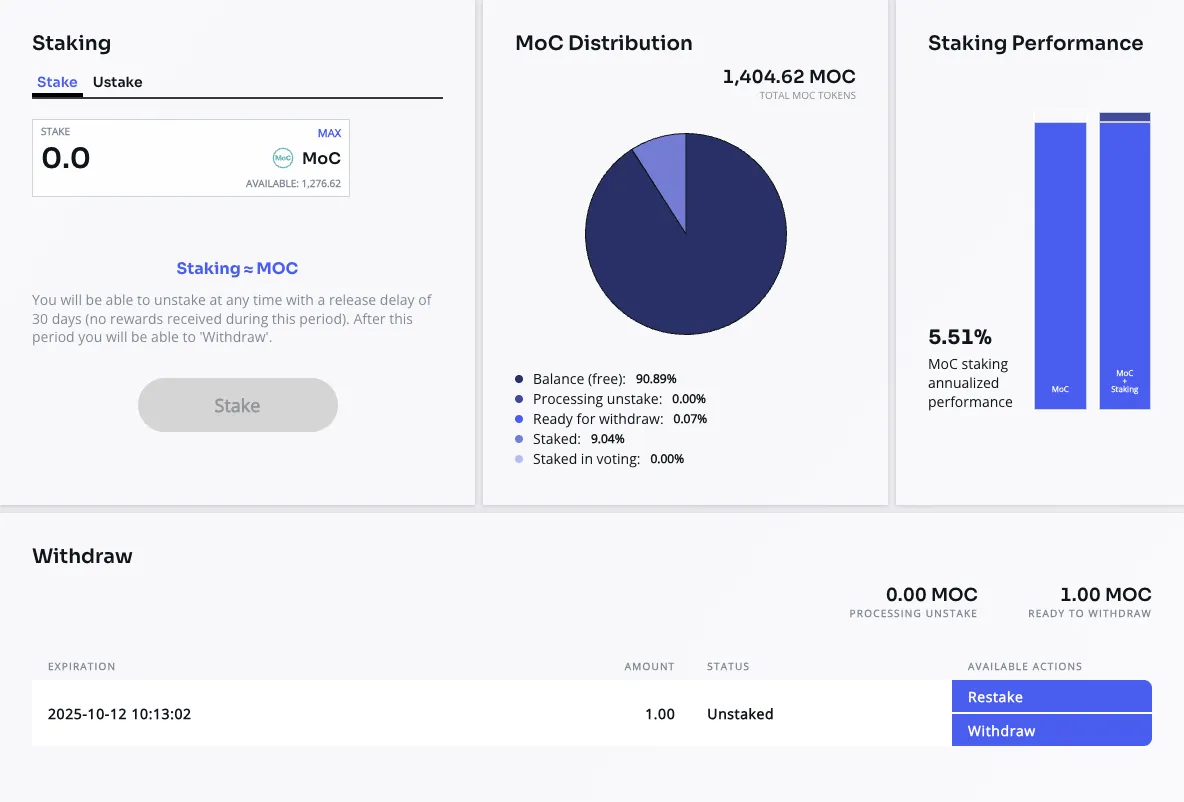
Staking overview: the Stake form, MOC distribution, annualized performance and withdrawal requests with Restake and Withdraw actions. Balances, percentages, dates and performance shown are illustrative; check the current information in the dApp. The displayed performance is not a guaranteed return.
| Balance | Meaning |
|---|---|
| Balance | MOC available in your wallet |
| In Stake | MOC currently in staking |
| Unstaking | MOC in the withdrawal waiting period |
| Ready to Withdraw | MOC available to withdraw |
| Stake in Voting | Stake involved in governance and subject to its lock rules |
Stake MOC
- Select Stake.
- Enter the amount of MOC to stake.
- Approve the use of MOC if requested.
- Confirm the staking transaction in your wallet.
- Check your updated In Stake balance.
Rewards accrue according to the staking program while your tokens remain staked.
Request an unstake
- Open Unstake.
- Enter the amount you want to remove from staking.
- Confirm the request in your wallet.
The request enters a 30-day waiting period. Check its unlock date in the application. The unstaking amount does not receive staking rewards during this period.
Withdraw your tokens
Once the waiting period ends, select Withdraw on the available request and confirm in your wallet. The tokens return to your wallet balance.
To return a request to staking, use Restake where available. A later unstake starts a new waiting period. Stake locked by voting remains subject to the proposal’s lock rules.