

On this page
Learn how to mint two tokens together by depositing collateral, or redeem both tokens together to receive collateral, using Combined Operations.
Understand the combined flow
USDRIF is the protocol’s USD-pegged stablecoin. Combined operations with RIF mint or redeem USDRIF and RIFP (RIF Pro, also called RIFPRO). RIFP represents the residual value of the RIF bucket’s collateral after accounting for USDRIF liabilities; it is not a stablecoin. A bucket is a separate accounting compartment for one collateral asset.
A combined mint provides the collateral corresponding to both tokens you receive: USDRIF and RIFP. In a combined redemption, you send both tokens and receive the collateral corresponding to the pair. The protocol calculates the second token amount from the amount you enter to maintain the bucket’s coverage; the split cannot be chosen arbitrarily.
These operations mint or redeem both tokens in the proportion needed to maintain the bucket’s coverage. This allows operations without changing that ratio, even when coverage restricts a standalone USDRIF mint or RIFP redemption. They remain subject to available amounts and other protocol limits.
Connect to the dApp
Select Rootstock Mainnet (chain ID 30) in a compatible wallet and connect it through the dApp’s connection button. Never share your recovery phrase. Connect the account holding your tokens and open Combined Operations. Keep rBTC for gas.
Select the operation
Use the input selector to choose collateral for a mint, or a residual token for a redeem. The central arrow reverses the direction.
| Operation | You send | You receive |
|---|---|---|
| Combined mint with RIF | RIF | USDRIF + RIFP |
| Combined redeem for RIF | RIFP + USDRIF | RIF |
These combined operations use RIF as collateral.
The available amount fields depend on the token pair and selected operation. After choosing the pair, check which fields the dApp allows you to edit, enter an amount in an enabled field and review the values filled in automatically. If you change the pair or operation direction, check the enabled fields and quote again.
Mint tokens together
- Select the collateral to send, for example RIF.
- Check the enabled fields for the selected pair and enter the amount you want to use.
- Review both token amounts to receive and the total collateral shown by the dApp.
With RIF, you receive USDRIF and RIFP. The RIF shown in Exchanging up to includes the collateral for both outputs.
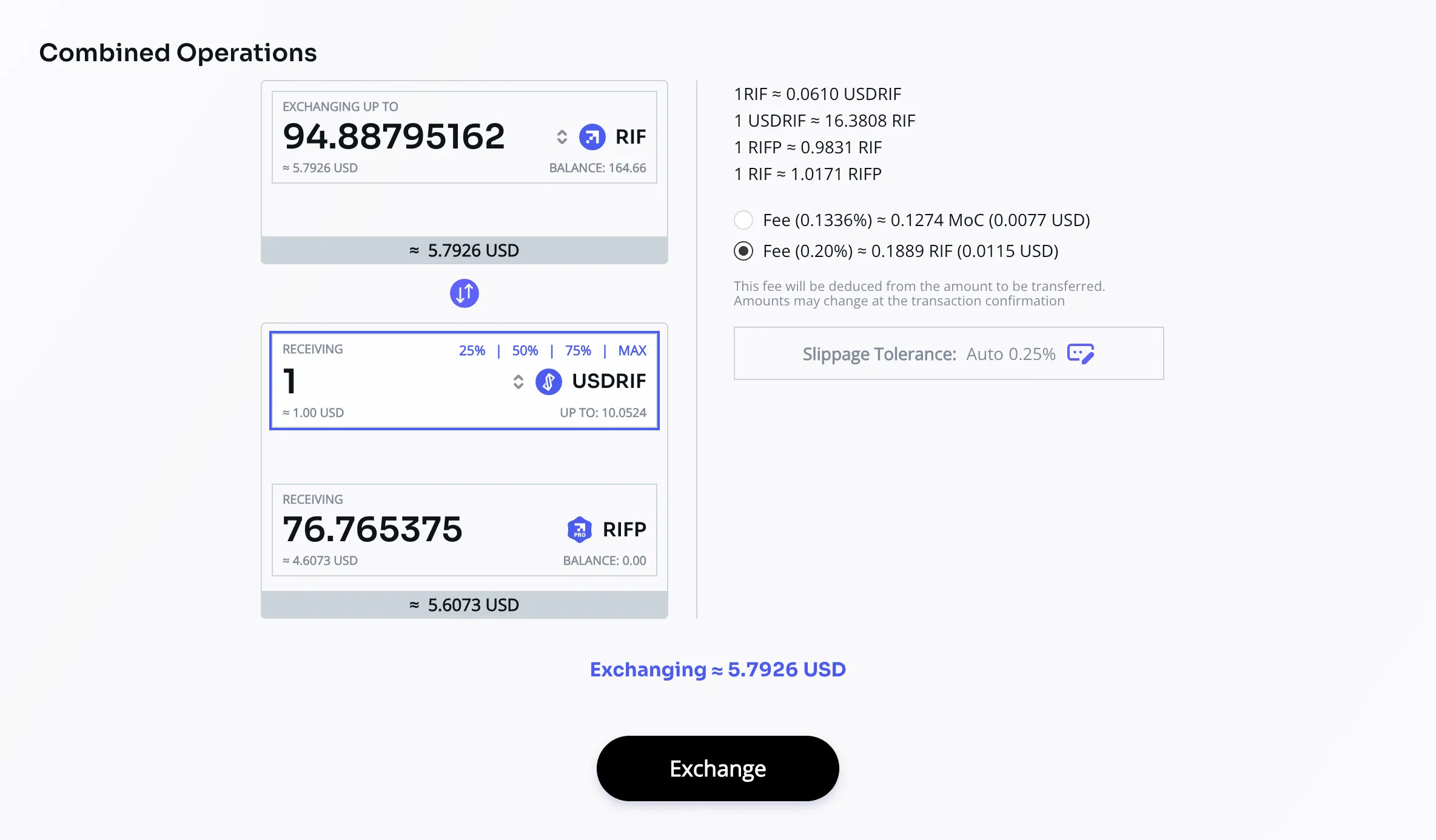
In this screenshot, the user entered 1 USDRIF to receive and the dApp automatically filled in the RIFP and the RIF required for both outputs. Editable fields may vary with the pair and operation. Prices, amounts and fees shown are illustrative.
Redeem tokens together
- Select the residual token to send, for example RIFP to receive RIF.
- Check which fields the dApp enables for the selected pair and enter an amount in an editable field.
- Review both token amounts to send and the collateral to receive shown by the dApp.
You need both input tokens. In the RIF example, the operation sends RIFP and USDRIF and returns RIF.
Review the transaction
Check all input and output amounts, the protocol fee and its payment token, slippage tolerance (Slippage Tolerance in the dApp) and available limits. The application calculates the token amounts for the combined operation.
Approvals, costs and execution
An approval authorizes the contract to use a token up to a spending limit (allowance). Check the contract and amount in your wallet, confirm and wait for confirmation before submitting the operation. In a combined redemption, each input token may need its own approval.
The protocol fee may be paid in the asset or MOC according to the displayed options. rBTC pays gas and execution costs, even when the protocol fee is zero. Slippage tolerance sets the permitted change in the quote: review the maximum to send and minimum to receive.
A Queued operation is awaiting execution; confirmation of submission does not mean you have received the tokens. Follow Last Operations through execution and check the balances. If it fails, check the reason before retrying: coverage, available limits or the quote may have changed.
Confirm the transaction
Approve the required input tokens if requested. A redemption may require approval of both tokens.
Click Exchange, review the summary and confirm in your wallet. Follow the request in Last Operations until execution completes.
If an operation is unavailable
Check the selected network, wallet balances, rBTC for gas and token allowances. Coverage compares the value of the bucket’s collateral with its USDRIF liabilities. A standalone USDRIF mint with RIF or a RIFP redemption can be limited if it would breach the required coverage. USDRIF redemption also depends on liabilities available in the chosen bucket; a global “No limit” label does not override these checks.
A combined operation maintains the bucket’s coverage by moving collateral and minting or burning both tokens in the proportion calculated by the protocol. Other limits still apply.